Choosing The Best Streaming Device For Your Home Setup
Picking the right streaming device means balancing ease of use, content options, and compatibility with your TV. You want a device that feels intuitive and doesn’t add frustration over time. Streaming quality matters, but so does how you search and control what you watch. Consider if you want extra features like gaming or voice control. Also, think about how the device fits physically and connects to your home network. These factors influence how happy you’ll be day-to-day.
Different Needs For Different Viewers
- Those who want the sharpest 4K streaming with HDR support.
- Viewers who appreciate voice control for easier searching.
- People looking for a compact device that won’t clutter their setup.
- Gamers interested in cloud gaming without a console.
- Travelers who want a portable device for streaming on the go.
- Users who prefer a simple remote that controls TV power and volume.
Where The Fire Tv Stick 4k Plus Stands Out
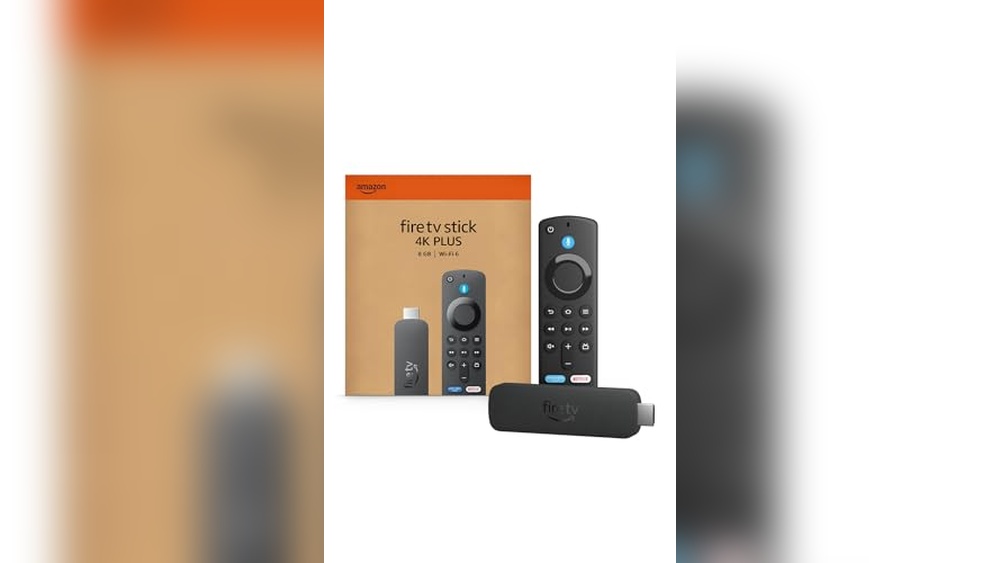
The Fire TV Stick 4K Plus is a solid choice if you want a device that supports vibrant 4K HDR streaming with Dolby Atmos audio. I find its AI-powered search with Alexa handy for finding shows by voice without fumbling through menus. It also adds value with Xbox cloud gaming, letting you play games without a console.
This stick works well if your home network supports Wi-Fi 6, ensuring smooth streaming even with multiple devices connected. Its size is compact enough to fit discreetly behind most TVs without blocking other ports.

Features That Ease Daily Use
- Alexa voice search finds content by actor, plot, or quotes.
- Supports Dolby Vision, HDR10+, and Dolby Atmos for immersive viewing.
- Wi-Fi 6 support helps maintain stable streaming with multiple devices.
- Cloud gaming integration offers casual Xbox gaming without extra hardware.
- Compact design fits easily behind TVs without blocking ports.
Considerations That May Matter
- Some users may find the Alexa interface has a learning curve.
- Gaming performance depends on internet speed and may not replace a console.
- The remote requires batteries and may feel bulky to some.
When The Roku Streaming Stick Hd Is A Practical Option
The Roku Streaming Stick HD appeals if you prefer a straightforward device with easy access to many free and live TV options. I appreciate its simple setup and the convenience of powering it directly from the TV, which means fewer cables and less clutter.
This stick is good for travelers or anyone who wants a portable streaming solution that’s easy to take along. The Roku remote also controls TV power and volume, cutting down on remote juggling.

Practical Strengths for Everyday Watching
- Compact design that doesn’t block adjacent HDMI ports.
- Powered directly from the TV, eliminating extra power cables.
- Roku voice remote controls TV power and volume.
- Access to many free movies, shows, and live TV channels.
- Easy to take on trips without complicated logins.
Points Worth Noting
- Streaming is limited to HD resolution, not 4K.
- Voice controls may not be as advanced as some competitors.
- Does not support advanced HDR formats or Dolby Atmos audio.
Key Questions That Guide Your Choice
How important is streaming in 4K Ultra HD with HDR support for your viewing experience? If your TV supports it and you want the best picture, that could sway your decision. Do you value having a smart voice assistant that understands detailed requests? That affects how quickly you find content.
Are you interested in cloud gaming without buying a console? This is a feature found only in one device here. Consider the physical setup: do you want a device powered by your TV or one that needs its own outlet? Also, how often will you travel with your streaming stick? Portability matters for some users.
Comparing Core Factors For The Best Streaming Device
Streaming Quality and Picture
Picture quality affects your viewing enjoyment, especially on larger screens.
| Decision factor | Fire TV Stick 4K Plus | Roku Streaming Stick HD |
|---|---|---|
| Resolution | Supports 4K Ultra HD with Dolby Vision and HDR10+ | Streams up to HD resolution only |
| Audio | Dolby Atmos support for immersive sound | Stereo sound, no advanced audio formats |
| Network | Wi-Fi 6 support for stable 4K streaming | Standard Wi-Fi, adequate for HD streaming |
| Ideal for | Users with 4K TVs wanting highest quality | Users with HD TVs or lower bandwidth needs |
This difference matters most for those with 4K TVs or who prioritize top-tier video and audio quality.
Voice Control and User Interface
Ease of finding content and controlling playback can affect daily satisfaction.
| Decision factor | Fire TV Stick 4K Plus | Roku Streaming Stick HD |
|---|---|---|
| Voice assistant | Alexa with advanced search by actor, plot, quotes | Roku voice remote with basic voice commands |
| Remote functions | Standard remote with Alexa voice, needs batteries | Remote controls TV power and volume as well |
| Interface | Fire TV OS with app store and features | Roku OS with focus on simple access to free/live TV |
| Ideal for | Users wanting detailed voice search and smart home integration | Users preferring simple remote and easy channel access |
This matters if you want voice control that fits your style or prefer simplicity over complexity.
Portability and Setup
How you use the device and where you place it can influence convenience.
| Decision factor | Fire TV Stick 4K Plus | Roku Streaming Stick HD |
|---|---|---|
| Power source | Requires wall outlet for power | Powered directly from TV’s USB port |
| Size and design | Compact but slightly longer size | Smaller stick, less likely to block ports |
| Portability | Good for home use, less ideal for travel | Designed for easy travel and quick setup |
| Ideal for | Users with dedicated home setup | Frequent travelers or minimal setup fans |
These points matter if you want a device that fits your living space or travel habits.
Will You Look Back On This Streaming Device Choice?
Regret often comes from unmet expectations or features you didn’t realize you needed. If you buy a device without 4K support but later upgrade your TV, you might wish you had chosen differently. Conversely, paying for 4K when you don’t have a compatible TV might feel like overspending.
Think about how much you value voice search and gaming features. Missing those can reduce convenience over time. Also, consider how portable you want your device to be—if you travel often, a stick that plugs into the TV’s USB port may save hassle.
Choosing with these points in mind can help ensure your streaming device fits your lifestyle without surprises.
Finding Peace With Your Streaming Device Decision
Both the Fire TV Stick 4K Plus and the Roku Streaming Stick HD offer solid ways to enjoy streaming content. Your choice depends on what features you prioritize most and how you use your TV setup. It’s better to pick a device that matches your current habits and tech rather than trying to cover every possible future need.
Remember, streaming devices are generally affordable and easy to replace if your needs change. Take comfort in knowing you can adjust your setup later if you want more features or better quality. For now, choose the one that feels right for your viewing style and home environment.
Common Questions About The Best Streaming Device
Does the Fire TV Stick 4K Plus support gaming?
Yes, it allows cloud gaming with Xbox Game Pass, letting you play games without a console. However, gaming performance depends on your internet speed.
Can I use the Roku Streaming Stick HD while traveling?
Yes, its compact design and TV-powered setup make it easy to take on trips. You can stream without logging into other devices.
Which device offers better picture quality?
The Fire TV Stick 4K Plus supports 4K Ultra HD with HDR and Dolby Vision. Roku Streaming Stick HD streams in HD resolution only.
Do both remotes support voice commands?
Both remotes have voice controls, but Fire TV’s Alexa offers more advanced search features. Roku’s voice remote handles basic commands and TV control.
Is Wi-Fi 6 important for streaming devices?
Wi-Fi 6 provides more stable streaming when multiple devices share your network. The Fire TV Stick 4K Plus supports it, which can improve 4K streaming reliability.
Will these devices work with any TV?
Both require an HDMI port on your TV. Fire TV Stick 4K Plus benefits from 4K-capable TVs, while Roku Streaming Stick HD works well with HD TVs.
How easy is it to set up these streaming sticks?
Both devices are designed for simple setup with step-by-step on-screen instructions. Roku’s stick powers from the TV, which reduces cables, while Fire TV needs a power outlet.